
SMS Notifications
Last updated: August 6, 2026
SMS Notifications — How Flagnog Text Messaging Works (Flagnog LLC)
Last updated: August 13, 2026
How Flagnog SMS notifications work
Flagnog is a business platform for brand partnerships at https://admin.flagnog.com. Registered account holders may choose to receive account-related text messages. SMS notifications are off by default and are enabled only when a user opts in and verifies their own mobile number. Flagnog never imports, purchases, rents, or enrolls phone numbers from any third-party list.
How a user opts in
Because SMS notifications are an account setting, opt-in happens inside a signed-in Flagnog account. The steps are:
1. The user signs in to their Flagnog account at https://admin.flagnog.com.
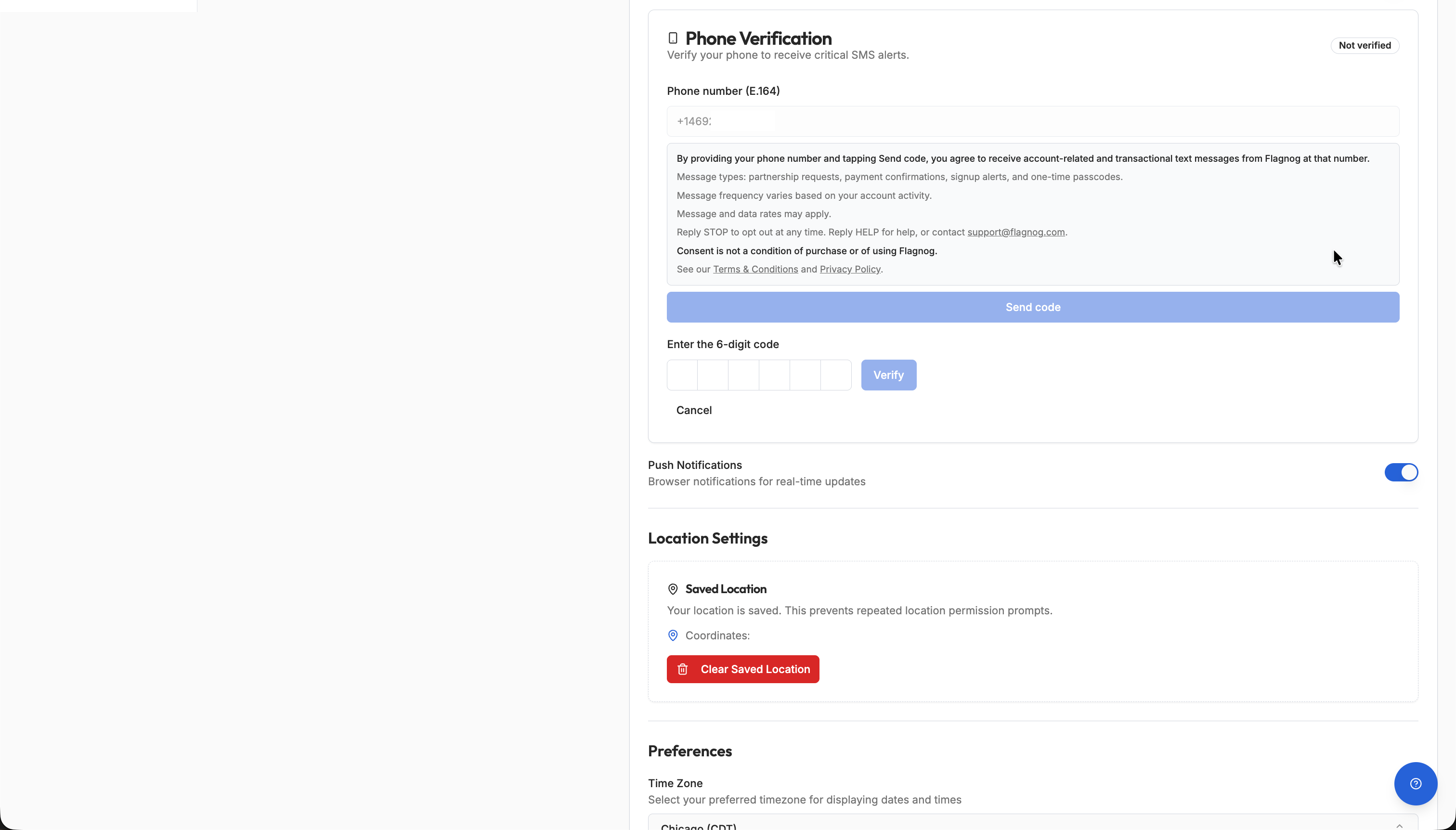
2. They open Settings → Profile → Phone Verification.
3. They enter their own mobile number and read the SMS consent disclosure shown directly above the button.
4. They select Send code. Flagnog sends a one-time verification code by SMS.
5. They enter that code to confirm the number. Only then are SMS notifications enabled. This is a double opt-in: the user voluntarily enters the number, then proves control of it with a one-time code. Consent applies only to the number verified in this way.
The consent disclosure shown at opt-in
By completing phone verification, you consent to receive the following types of non-marketing text messages from Flagnog:
• One-time passcodes and verification codes — to confirm your phone number and secure your account
• Partnership and claim notifications — such as a brand requesting a partnership or an update on a claim you're involved in
• Account and signup alerts — such as a new user joining your workspace, or confirmation that SMS notifications were enabled on your account
• Payment and transaction confirmations — such as confirmation of a payment you made or received.
Flagnog does not send marketing or promotional text messages; your consent covers only the account-related, transactional, and verification messages listed above. Message frequency varies based on your account activity. Message and data rates may apply. Consent is not a condition of any purchase or of using Flagnog. Reply STOP to opt out at any time or HELP for help. See our Terms & Conditions (section 10) and Privacy Policy linked below.
Screenshots of the opt-in flow
See below
Sample messages
Flagnog: You have received a new partnership request. Log in to review it. Reply STOP to opt out, HELP for help.
Flagnog: Your partner has completed the payment for your activation. Reply STOP to opt out.
Flagnog: Your one-time passcode is 123456. It expires in 10 minutes. Do not share this code.
How to opt out
Reply STOP to any message, or turn off SMS Notifications in Settings. Reply HELP for help, or contact support@flagnog.com.
Policies
Terms & Conditions — https://flagnog.com/company-pages/terms-and-conditions
Privacy Policy — https://flagnog.com/company-pages/privacy-policy
Contact Information
If you have any questions about these Terms, please contact:
Flagnog LLC
5 Cowboys Way
Frisco, TX 75034
Email: legal@flagnog.com

Supported by many companies world-wide